UEFI Secure Boot overview
UEFI Secure Boot is a firmware-level security feature defined by the Unified Extensible Firmware Interface (UEFI) specification that safeguards the system’s boot process by verifying the digital signatures of EFI applications before execution, using a set of trusted keys and signature databases maintained in UEFI secure variables.
References:
UEFI application authentication
The UEFI application authentication process relies on verifying the application’s digital signature against trusted keys and signature databases stored in the firmware’s non-volatile secure variables, each serving a distinct role in establishing and maintaining the chain of trust:
-
Platform Key (
PK): Acts as the root of trust for the entire Secure Boot framework. It identifies the system owner and authorizes changes to the Secure Boot configuration and key databases. When the Platform Key (PK) is cleared, the system enters setup mode, disabling Secure Boot and allowing unrestricted updates to all secure variables. Once a validPKis installed, the system switches to user mode, where any modification to the other Secure Boot variables requires a valid digital signature from an authorized parent key. -
Key Exchange Keys (
KEK): Authorized by thePK, this variable stores a signature database containing one or more public keys that allow trusted entities to update the allowed and forbidden signature databases securely. In user mode, any updates to thedbordbx(see bellow) databases must be signed with the private key corresponding to one of these keys. -
Allowed Signature Database (
db): Contains trusted certificates, public keys, and hashes of EFI binaries that are permitted to execute during boot. -
Forbidden Signature Database (
dbx): Holds revoked or blacklisted signatures for EFI binaries or certificates known to be insecure or compromised.
During the boot process, the firmware validates the digital signature of the
EFI executable by checking that its certificate or hash exists in the db and
does not appear in the dbx. If the verification succeeds, the firmware
executes the component; otherwise, it is blocked. This layered verification
mechanism ensures that the system boots only with software that originates from
verified, trusted sources.
Machine-Generic Authentication with SWK1
The UEFI db secure boot variable holds the public part of an asymetric key
pair. This corresponds to SWK1 in Welma. If db holds other keys,
SWK1 should be the first one in the key list.
SWK1 algorithm: RSA-2048
SWK1 is used:
- By the UEFI to authenticate the comboapp
- By the initramfs script to authenticate filesystem partitions (dm-verity)
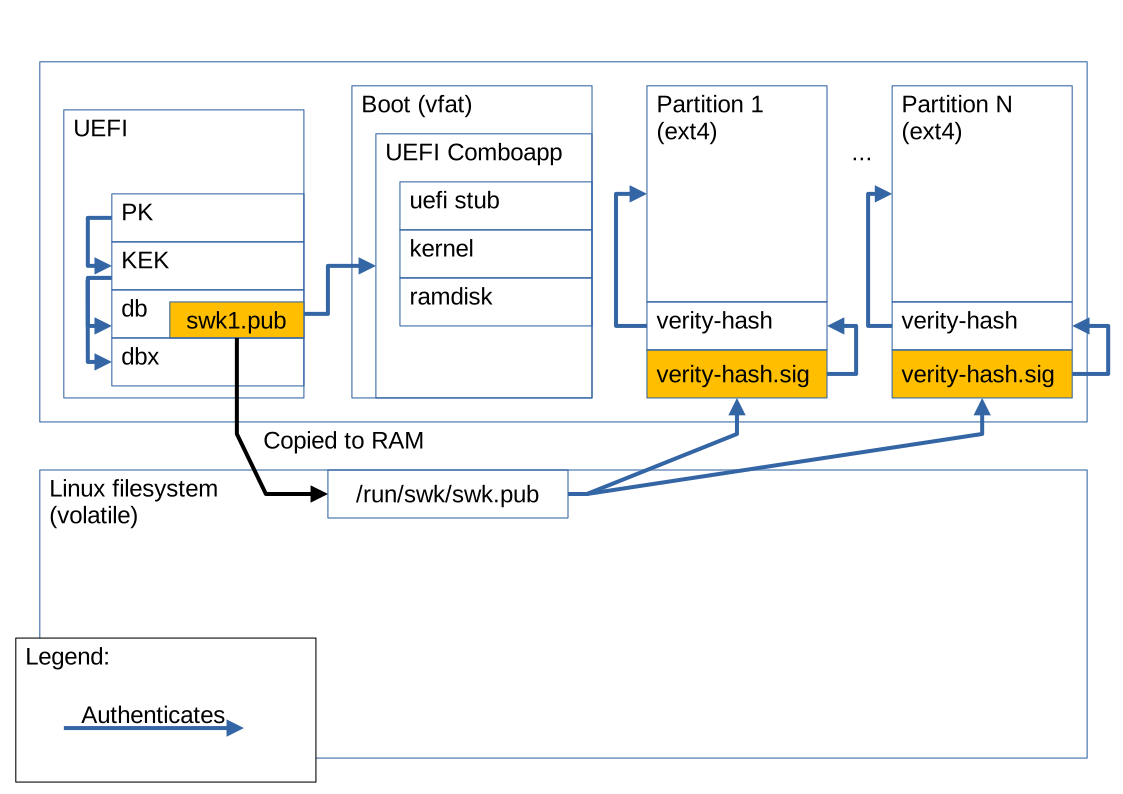
swk1.pub: public part ofSWK1verity-hash.sig: signature of dm-verity root hash
The initramfs script reads the db variable to extract the public key from
the UEFI and makes it available for userspace programs to authenticate ext4
filesystem partitions.
Key Delegation with SWK2
Alternatively, it is possible for SWK1 to delegate the authentication of filesystem partitions to another key held in the ramdisk: SWK2.

swk2.pub: public part of SWK2
The keys available for userspace programs are:
Notes:
- SWK2 can be of any algorithm supported by openssl.
- If both SWK1 and SWK2 were present, the latter would take precedence in userspace.
Filesystem authentication
This authentication is essentially based on dm-verity, which is a linux kernel feature.
When WELMA_SECURE_BOOT is activated, the partitions with the verity
flag in the split file
are protected by this mechanism. This allows the kernel to check the
completeness of these partitions after each reboot and before mounting them.
Protected partitions have a header containing information identifying the partition. In addition, the block hash tree is contained just after the file system blocks.
The built partitions has the .verity extension and is structured as follows:
+----------+--------------+--------------+------------------+ --------
|  MAGIC   |   VERSION    | TOTAL LENGTH | HASH TREE OFFSET |     ^
+----------+--------------+--------------+------------------+     |
|     ROOT HASH SIZE      |          ROOT HASH              |     |
+-------------------------+---------------------------------+     |
|   ROOT HASH SIG SIZE    |      ROOT HASH SIGNATURE        |     | Welma Header (4K)
+-------------------------+---------------------------------+     |
|    CERTIFICATE SIZE*    |         CERTIFICATE*            |     |
+-------------------------+---------------------------------+     |
|                      Padding                              |     v
+-----------------------------------------------------------+ --------
|                                                           |     ^
|                                                           |     |
|                                                           |     |
|                                                           |     |
|                  EXT4 data partition                      |     | Filesystem
|                                                           |     |
|                                                           |     |
|                                                           |     |
|                                                           |     v
+-----------------------------------------------------------+ --------
|                                                           |
|                    Hash Tree block                        |
|                                                           |
+-----------------------------------------------------------+
The secure boot stages in initramfs are:
- Authenticate the
ROOT HASHof the partition with/run/swk/swk.pub - Mount the partition with dm-verity: the kernel checks that the
ROOT HASHmatches theEXT4data partition
Yocto configuration
You need to set in your local.conf:
This will build:
- Embedded code for secure boot
- Images signed and provisioned with development keys:
WELMA_KEY_SWK1_PUB,WELMA_KEY_SWK1_PRIV,WELMA_KEY_SWK2_PUB,WELMA_KEY_SWK2_PRIV
For additional information on configuring secure boot for your platform, please refer to UEFI Secure Boot Setup page