Partitioning
Overview
Welma helps you to customize your partition layout.
Features:
- Split the main Linux filesystem into smaller fs stored on distinct physical partitions, that can be updated separately.
- Select which filesystem shall be verified by secure boot.
- Select mounting options (read-only, read-write, noexec, ...).
- Select software update mechanism for each partition: A/B, single, none.
- Compatible with secure boot
Runtime architecture
On the embedded Linux system, the partition layout is described in the file
/etc/welma-partitions.conf.
At boot time, this file is used by the initramfs script, to:
- create symbolic links
/dev/disk/partitions/{inactive,single} - locate the partitions to be mounted
- authenticate those under secure boot
- mount them and give form to the final rootfs.
On software update, the partitions where packages get installed are located
after the symbolic links /dev/disk/partitions/{inactive,single}.
Yocto configuration
Welma relies on two dedicated files: .split file and .part:
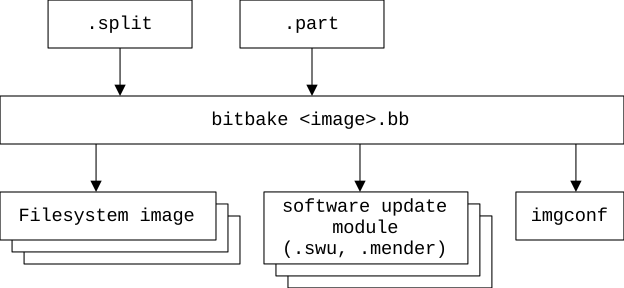
Part file
The .part file defines the physical layout of partitions on the storage
device. Each entry specifies an individual partition on the disk.
The name of this file is given by IMAGE_PART_FILE or IMAGE_PART_FILES.
The file is searched in BBPATH, under directory split/. The first one found
is used.
Default values:
IMAGE_PART_FILE = "${IMAGE_BASENAME}.${MACHINE}.part"
IMAGE_PART_FILES = "${IMAGE_PART_FILE} ${IMAGE_BASENAME}.part welma.${MACHINE}.part welma.part"
Contents:
Each entry is described on a separate line. Fields on each line are separated
by tabs or spaces. Characters after '#' are comments and ignored. Blank lines
are ignored. ${VAR} patterns are expanded from the same bitbake variables.
Each entry is made of 3 fields: "part" PARTNAME OPTIONS
Example:
part    bootloader  update=single,dev=/dev/mmcblk0p1
part    boot        update=ab,dev=/dev/mmcblk0p3:/dev/mmcblk0p4
part    sysro       size=350M,update=ab,dev=/dev/mmcblk0p5:/dev/mmcblk0p6
part    appro       size=15M,version=0.0,update=ab,dev=/dev/mmcblk0p7:/dev/mmcblk0p8
part    sysrw       size=400M,dev=/dev/mmcblk0p9
Warning
The boot partition, which holds the Linux kernel (either in a FIT image or a comboapp) must always be positioned as the first A/B partition on the disk.
Partition name (PARTNAME):
- Must be unique in the file (several partitions cannot share the same name).
- Must only use 7-bit ASCII lower-case letters, digits and dashes
Partition options (OPTIONS):
The OPTIONS field contains one or more OPTION sub-fields separated by comma (,).
The OPTION dev= is mandatory. The others are optional.
OPTION can be:
-
dev=DEVICEordev=DEVICE1:DEVICE2: Specifies the physical partition(s) on the disk where the filesystem should be installed. For A/B mode, 2 devices must be specified, separated by a colon (:). Eg:dev=/dev/mmcblk0p1ordev=/dev/mmcblk0p4:/dev/mmcblk0p5. -
devoffset=VALUE: Specifies at which offset the partition starts, within the device (given bydev=). Default:0.- Supported units:
K(this is the default),M,G. - Not compatible with
update=other thansingle. - Not compatible with
devtype=flash.
- Supported units:
-
devtype=VALUE: Specifies the type of the physical partition. This impacts how software update will write to the physical partition.- Supported values:
block(block device, this is the default),flash(raw flash device, generally with dev=/dev/mtd...). - Not compatible with
update=other thansingle.
- Supported values:
-
size=VALUE: Specifies the size of the physical partition. Supported units for VALUE areK(kibibytes, KiB),M(MiB), andG(GiB), with the default unit beingK. It generates a helper variable namedPARTITION_SIZE_<partname>, which holds the corresponding size value for that partition.- If size is given together with
update=single, it is used to limit the partition size, so that software update cannot write beyond. - Not compatible with
devtype=flash.
- If size is given together with
-
update=VALUE: Specifies the software update mode for this partition. Supported values:no: The partition is not subject to software update (this is the default).ab: The partition may be updated in A/B mode and defines 2 physical partitions.single: The partition may be updated in single mode.
-
version=VALUE: Specifies a version string.DISTRO_VERSIONis the default value. This information used for:- creating files
/etc/module.versioninside each sub-filesystem - setting the version number in Mender artifacts (when using Mender)
- creating files
Split file
The .split file defines how the root file system should have directories:
- split in smaller file systems, with a
splitentry - stored on another file system, with a
migrateentry.
This enables precise tailoring regarding:
- mounting file systems read-only or read-write
- updating file systems separately
The name of this file is given by IMAGE_SPLIT_FILE or IMAGE_SPLIT_FILES.
The file is searched in BBPATH, under directory split/. The first one found
is used.
Default values:
IMAGE_SPLIT_FILE = "${IMAGE_BASENAME}.${MACHINE}.split"
IMAGE_SPLIT_FILES = "${IMAGE_SPLIT_FILE} ${IMAGE_BASENAME}.split welma.${MACHINE}.split welma.split"
Contents:
Each entry is described on a separate line. Fields on each line are separated
by tabs or spaces. Characters after '#' are comments and ignored. Blank lines
are ignored. ${VAR} patterns are expanded from the same bitbake variables.
Example:
split   boot    /boot   vfat    overhead=1.1,minsize=4096,boot,mount=ro
split   sysro   /       ext4    overhead=1.1,verity
split   appro   /app    ext4    overhead=1.1,extrasize=4096,verity,systemd
split   sysrw   /var    ext4    overhead=1.3,extrasize=390000,mount=defaults:noexec

migrate /home   /var/home   bind
Lines must be either of:
"split" PARTNAME MOUNTPOINT FSTYPE OPTIONS: defines a partition"migrate" SRCDIR DSTDIR METHOD: defines the relocation of a directory SRCDIR to another place DSTDIR (either in the same partition, or a different one). Typically used to have a read-write subdirectory within a read-only filesystem.
Filesystem name (PARTNAME):
The filesystem name must comply with the following two rules:
- It must be unique in the file (several filesystems cannot share the same name).
- Only use lower-case characters, digits and dashes are supported
- It must be defined in the
partfile
Mount point (MOUNTPOINT):
The filesystem mount point must exist within the rootfs produced by the build.
It serves as the source directory from which the file tree is taken to construct
the final file system.
Filesystem type (FSTYPE):
The type of file system selected must be supported by Yocto.
Options (OPTIONS):
The filesystem options supported in .split files are:
overhead(optional): It is a floating-point value representing the additional space required for filesystem metadata. It must always be greater than or equal to1.0. Default value is set to1.3.minsize(optional): It specifies the minimum amount of space, inkilobytes, that must be allocated within the filesystem to ensure it can accommodate the necessary data and structure during creation. Default value is set to8192.extrasize(optional): It specifies the additional space, in kilobytes, that should be included in the filesystem beyond the total size of the files it contains. Default value is set to0.verity(optional): Flag indicating that the filesystem should be mounted with dm-verity.WELMA_SECURE_BOOTshould be activated to be able to useverityoption. Please refer to this page for more details about verity usge in Welma.boot: Flag to be set for the filesystem that contains the Linux kernel (i.efitimage,comboapp)mount(optional): Specify the filesystem mount options, column separated. Default value is set toro.systemd(optional): Flag indicating that the filesystem's mount point should be included in theSYSTEMD_UNIT_PATHsystemd user unit search path, allowing systemd services to be located and run from within this filesystem.deps(optional): Flag indication partition dependencies. Please refer to this page for more details about version controltag(optional): Flag to enable or disable tags. Please refer to this page for more details about version control
Migration method (METHOD):
The migration moves the files of SRCDIR to DSTDIR and makes them available through SRCDIR with either of these methods:
-
This line relocates the contents ofbind: makes the directory available through a bind-mount. For example:/hometo/var/home, and adds the following entry to/etc/fstab: -
This line transfers the contents oflink: makes the directory available through a symbolic link. For example:/data/shared-datato/var/shared-dataand then creates the following symbolic link:
Working with wic images
The .part and .split files do not produce a partitioned disk image.
If you're using the wic tool to do that,
make sure to have its description file (wks) synchronized with
the partition layout defined in the .part and .split files.
In the WKS description, you may use the following variables, that are set after
the .part and .split files:
PARTITION_SIZE_<partname>: will be set to the value of the partition OPTIONsize=.IMG_SUFFIX_<partname>: will be set to.verityif dm-verity is used.
Eg:
part --source rawcopy --sourceparams="file=${IMGDEPLOYDIR}/${IMAGE_LINK_NAME}.sysro.ext4${IMG_SUFFIX_sysro}" --fixed-size ${PARTITION_SIZE_sysro}
Usage
Create your first minimal .part file
In this example, we explain how to create your first and minimal .part
and .split files.
Preliminary assumptions:
- You are using a layer
meta-projectfor your specific project and your main image ismeta-project/recipes-project/images/project-image.bb - You are using
swupdateas SW update mechanism. - You are using Wic to produce a full sdcard image, and your wks file looks like:
part --fixed-size 3M --source rawcopy --sourceparams="file=bootloader.bin"
part --fixed-size 50M --source rawcopy --sourceparams="file=${IMGDEPLOYDIR}/${IMAGE_LINK_NAME}.boot.vfat"
part --fixed-size 50M
part --fixed-size 400M --source rawcopy --sourceparams="file=${IMGDEPLOYDIR}/${IMAGE_LINK_NAME}.sysro.ext4"
part --fixed-size 400M
part --fixed-size 500M --source rawcopy --sourceparams="file=${IMGDEPLOYDIR}/${IMAGE_LINK_NAME}.sysrw.ext4"
bootloader --ptable gpt
- Your target device has emmc storage (/dev/mmcblk0).
Procedure:
- Create your
.partfile that will override Welma's: - Create your
.splitfile that will override Welma's:
As a result:
bitbake project-imagewill generate SW update modules:- You can send and install these onto your target (using
updatectl install).
If you need to update the bootloader in single mode, please see the next section.
Upgrade from Welma 1.3.0
When upgrading from Welma 1.3.0 (or a prior version), you need to replace your
partitions .conf file by a .part.
Example:
# NAME   MOUNTPOINT   DEVICE A         DEVICE B        OPTIONS
boot     /boot        /dev/mmcblk2p1   /dev/mmcblk2p2  boot
sysro    /            /dev/mmcblk2p3   /dev/mmcblk2p4
appro    /app         /dev/mmcblk2p5   /dev/mmcblk2p6
var      /var         /dev/mmcblk2p7
Should be replaced by:
part boot   update=ab,dev=/dev/mmcblk2p1:/dev/mmcblk2p2
part sysro  update=ab,dev=/dev/mmcblk2p3:/dev/mmcblk2p4
part appro  update=ab,dev=/dev/mmcblk2p5:/dev/mmcblk2p6
part var    dev=/dev/mmcblk0p7
And the boot option should be placed in the .split file:
Configure the bootloader with single mode update
In this example, we explain how to configure the bootloader partition. This will allow you to perform remote updates of the bootloader.
You can also use this example for other types of contents that will need to be updated, such as firmware images,...
Preliminary assumptions:
- You are using a layer
meta-projectfor all that is specific to your project. - You are using this
.partfile that is overriding Welma's default: - You are using
swupdateas SW update mechanism. - The bootloader is a single binary
- generated by Yocto in
${DEPLOY_DIR_IMAGE}/bootloader.bin - installed on your device on the emmc user partition (/dev/mmcblk0) at offset 32 KiB.
- generated by Yocto in
Procedure:
- Add this line to
meta-project/split/welma.part: - Specify the binary file of the bootloader that should be shipped for remote software update:
As a result:
bitbake project-imagewill generate a SW update module for the bootloader:${DEPLOY_DIR_IMAGE}/${IMAGE_LINK_NAME}.bootloader.swu.- You can send and install this file onto your target (using
updatectl install).
Mount rootfs in read-write mode
Though this is not recommended for production usage, at early stages of the developement cycle, it may be useful for developers to work with a read-write root filesystem.
This can be achieved as follows:
- in the
.splitfile:- remove the
verityflag (if any) - add
mount=rw
- remove the
Eg:
- if your
/etc/fstabspecifies read-only mode for/, then it overrides the previous and you also need to modify/etc/fstaband set read-write mode there.
Insert a data partition
In this example, we explain how to add a raw partition.
Preliminary assumptions:
-
Your partition layout is:
-
You are using a
.partfile like this one: -
You want to add a new partition in the empty space.
Procedure:
-
Modify your
.partfile to move the partition indexes by one: -
If using U-Boot (or any other bootloader), make it aware that the partition index of the kernel was moved by one. We do that through the
CONFIG_BOOTFLAGS_FIRST_ACTIVE_PARTITIONparameter in our BSP adaptation layers. -
Align your first-install procedure as well (for instance, if using wic then align your wks, etc.)
Full example
In this example we will configure our partitions as follows:
boot: 50Mb partition holding boot artifacts from/boot, withA/Bupdate support to be mounted on/bootinread-onlymode.sys: 350Mb partition holding the Root filesystem, withA/Bupdate anddm-veritysupport, mounted on/.-
app: 50Mb partition hosting the application filesystem, withA/Bupdate andsystemd user unitssupport, mounted on/appwithdm-verityprotection.Note
The application Yocto recipes—including those that install systemd units— should install all their artifacts under the
/appdirectory. -
log: 500Mb partition holding the system logs, mounted on/var/loginread-write,noexecmode. -
var: 400Mb partition holding thevarfilesystem, mounted on/varinread-write,noexecmode. -
/hometo be binded to/var/home
In this example, we’ll assume the platform has an eMMC enumerated
at /dev/mmcblk0. The first partition will be used for the First
Stage Bootloader and the second partition to store the Bootflags
structure.
To implement this partitioning layout, follow these steps:
-
Add your
meta-projectto the build environment.Warning
Please ensure that your project layers are listed first before
meta-welmalayer to be able to use your customizedsplitandpartfiles -
If U-Boot is used, make sure to set
CONFIG_BOOTFLAGS_FIRST_ACTIVE_PARTITION=0x03in its configuration. -
Create
splitandpartfiles undermeta-project/splitdirectory as follow:welma.splitsplit boot /boot vfat overhead=1.1,minsize=4096,boot split sys / ext4 overhead=1.1,verity split app /app ext4 overhead=1.1,extrasize=4096,verity,systemd split log /var/log ext4 overhead=1.3,extrasize=390000,mount=defaults:noexec split var /var ext4 overhead=1.3,extrasize=390000,mount=defaults:noexec migrate /home /var/home bind -
For WIC-based image types, the description file should be structured as follows:
part --source rawcopy --sourceparams="file=<YOUR-FSBL>" # bootflags part --align 3072 --size 1M # boot part --source rawcopy --sourceparams="file=${IMGDEPLOYDIR}/${IMAGE_LINK_NAME}.boot.vfat${IMG_SUFFIX_boot}" --align 8192 --fixed-size ${PARTITION_SIZE_boot} part --source rawcopy --sourceparams="file=${IMGDEPLOYDIR}/${IMAGE_LINK_NAME}.boot.vfat${IMG_SUFFIX_boot}" --fixed-size ${PARTITION_SIZE_boot} # sys part --source rawcopy --sourceparams="file=${IMGDEPLOYDIR}/${IMAGE_LINK_NAME}.sys.ext4${IMG_SUFFIX_sys}" --fixed-size ${PARTITION_SIZE_sys} part --source rawcopy --sourceparams="file=${IMGDEPLOYDIR}/${IMAGE_LINK_NAME}.sys.ext4${IMG_SUFFIX_sys}" --fixed-size ${PARTITION_SIZE_sys} # app part --source rawcopy --sourceparams="file=${IMGDEPLOYDIR}/${IMAGE_LINK_NAME}.app.ext4${IMG_SUFFIX_app}" --fixed-size ${PARTITION_SIZE_app} part --source rawcopy --sourceparams="file=${IMGDEPLOYDIR}/${IMAGE_LINK_NAME}.app.ext4${IMG_SUFFIX_app}" --fixed-size ${PARTITION_SIZE_app} # log part --source rawcopy --sourceparams="file=${IMGDEPLOYDIR}/${IMAGE_LINK_NAME}.log.ext4${IMG_SUFFIX_log}" --fixed-size ${PARTITION_SIZE_log} # var part --source rawcopy --sourceparams="file=${IMGDEPLOYDIR}/${IMAGE_LINK_NAME}.var.ext4${IMG_SUFFIX_var}" --fixed-size ${PARTITION_SIZE_var} bootloader --ptable gpt -
Build and flash the image. You can verify the running partition layout in
/etc/welma-partitions.confthat should be structured as follows:/etc/welma-partitions.conf# NAME MOUNTPOINT DEVICE-A DEVICE-B FLAGS OPTIONS boot /boot/ /dev/mmcblk0p3 /dev/mmcblk0p4 boot ro app /app/ /dev/mmcblk0p7 /dev/mmcblk0p8 verity ro log /var/log/ /dev/mmcblk0p9 - - defaults,noexec var /var/ /dev/mmcblk0p10 - - defaults,noexec sys / /dev/mmcblk0p5 /dev/mmcblk0p6 verity ro
 You have successfully implemented your custom partitioning layout
Monolithic rootfs with U-Boot
This section explains how you could configure a monolithic rootfs partition that contains all (kernel, rootfs, /var, ...), with A/B mode update.
Warning
We do not fully support this configuration as we do not test it and it has
issues: not compatible with secure boot, /etc/machine-id not correctly
handled, read-only vs read-write issues, and other system tweaks would
probably be needed to get a fully operational Linux system...
We just keep this section for the record.
This can be achieved as follows:
-
Modify your u-boot recipe as follows:
-
Ensure that u-boot is configure with
CONFIG_FS_EXT4=y
How to Relocate Bootflags
The bootflags are stored as a raw memory segment that must be accessible by:
- The bootloader (if any)
- Linux userspace programs (read and write)
Warning
The bootflags partition in UEFI based machines is distinguished
by its part-name in the partition table: "bootflags". This name is set in the wks file and
should not be changed.
The following parameters can be modified in your global configuration
(local.conf or ${MACHINE}.conf):
BOOTFLAGS_PATH: path in Linux userspace context. Note that if the path pointed to byBOOTFLAGS_PATHdoes not exist, Welma will create it and point it to the partition namedbootflags(this option offers flexibility so that bootlfags can be used on the boot disk without necessarily knowing how the kernel will enumerate it). In this case, this parameter must be set to a path under/dev/disk(e.g/dev/disk/bootflags).BOOTFLAGS_OFFSET: address of the main bootflags segment (in bytes) withinBOOTFLAGS_PATHBOOTFLAGS_OFFSET_COPY: address of the duplicate (in bytes) withinBOOTFLAGS_PATHBOOTFLAGS_DEFAULT_SLOTS: default slots for bootflags initialization (e.g2:4:6). Required for UEFI based machine.
The _OFFSET addresses should point at the beginning of a block (eg. if
the eMMC block size is 512, then the addresses must be multiple of 512), in
order to minimize chances of corruption in case of any hard reset.
Example:
U-Boot
When using U-Boot, you should also provide a configuration aligned with the above:
CONFIG_BOOTFLAGS_OFFSETand_COPY:
Example:
CONFIG_CMD_BOOTFLAGS=y
CONFIG_BOOTFLAGS_INTERFACE="mmc"
CONFIG_BOOTFLAGS_DEVICE=0
CONFIG_BOOTFLAGS_OFFSET=0x100000
CONFIG_BOOTFLAGS_OFFSET_COPY=0x100200
To ensure the system can locate the kernel partition when Bootflags are not set
(typically at the very first boot), the CONFIG_BOOTFLAGS_FIRST_ACTIVE_PARTITION
U-Boot Configuration is used. It should specify the index of the first active user
partition, which must correspond to the kernel partition.
Example:
To go further
For additional examples on how to write your .split and .part files based on your
partitioning scheme, please refer to the meta-demo-partitioning layer.
For more details on Welma's default layout implementation, please refer to the Reference Partition Layout and Boot Sequence page.