Generate update packages without Yocto
For developers, Welma offers a simple way to deploy an applicative partition
image (appro) to their target. It provides a deployment kit to create update
packages from your app folder.
Description
This is the big picture of the packaging and deployment process.
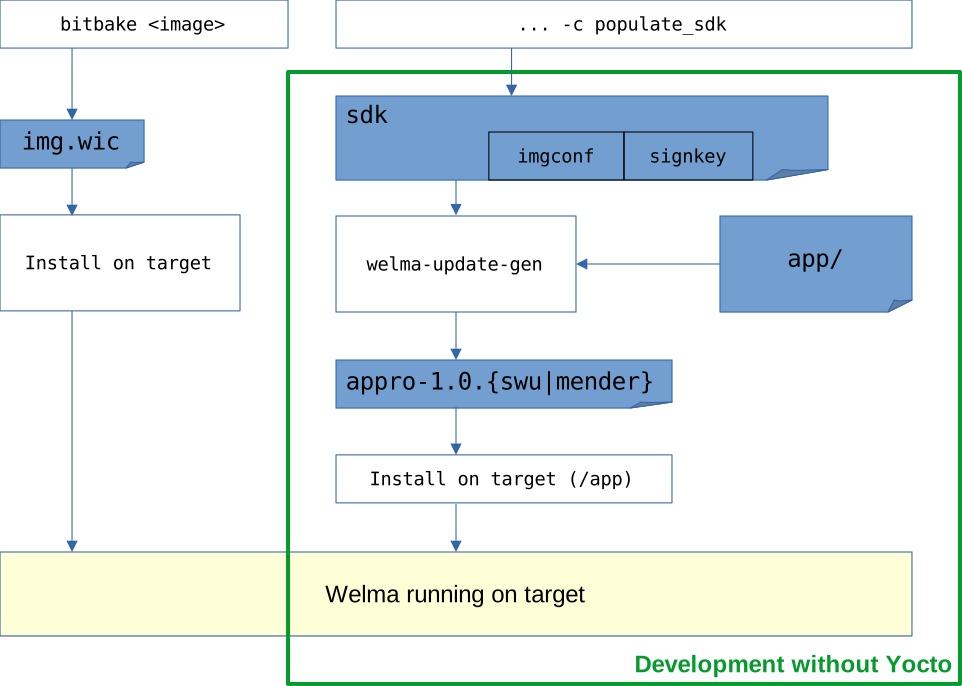
Notes:
welma-update-genpackages your application to be installed on your target (it is included in the SDK).- For convenience,
imgconfandsignkeyare integrated in thesdk.
A typical usage scenario would be:
bitbakeyour image and install it on your devicebitbake -c populate_sdkyour image and install the resulting SDK- develop your application and have the resulting files installed in a local
directory
./app/ - execute
welma-update-gento package./app/asappro-1.0 - upload
appro-1.0to your target and install it usingupdatectl install
Integrating within another SDK
You can have the tools integrated within another of Yocto SDK,
by adding the following to your local.conf:
And then build your SDK. Eg:
Note
In this case the imgconf and signkey files won't be part of the SDK and you will need to get them from the image build.
Usage of welma-update-gen
usage: welma-update-gen [-h] [-c CONFIG_FILE] [--sign-key SIGN_KEY]
                        [--software-version SOFTWARE_VERSION]
                        [--partition-size PARTITION_SIZE]
                        [--fs-extrasize FS_EXTRASIZE]
                        [--fs-overhead OVERHEAD]
                        [--partition-name PARTITION_NAME]
                        [--uid UID] [--gid GID] [-d]
                        SOURCE_DIR
Arguments
-
SOURCE_DIR: Path to the directory that contains the files to be installed. -
CONFIG_FILE: Configuration of the Welma image running on the target.- If not specified, the default config is searched in the SDK:
default-image.imgconf. - The format of this file should be:
- If not specified, the default config is searched in the SDK:
-
SIGN_KEY: Key used for signing the swupdate or mender artifact and the dm-verity root hash.- If not specified, the default signing key is searched in the SDK:
default-image.signkey.
- If not specified, the default signing key is searched in the SDK:
-
SOFTWARE_VERSION: Software version of the app (default:1.0). -
PARTITION_SIZE: Size of the partition in KB. This is only informational and will help detect if the final image size exceeds the partition size. -
UID: User identifier for all files of app (default:2000). -
GID: Group identifier for all files of app (default:2000). -
-d: Activates debug messages.
Example
-
Build your image and the SDK:
-
Install the SDK and setup the toolchain environment:
-
Develop your app, compile it and have your files deployed into a local directory
app. -
Package your app:
-
Deploy your app to your target:
($ scp appro-1.3.swu target:/var $ ssh target updatectl install /var/appro-1.3.swu $ ssh target reboot ... $ ssh target updatectl confirmtargetbeing configured in~/.ssh/config)
If you are using mender-connected as your update mechanism, you can also refer
to Mender Connected use case.
From now on, you can repeat the process:
- Modify your app
- Package your app
- Deploy to your target
- Test your app
You can also have a look at our more detailed use case Code, deploy and test using welma-update-gen