Use case 1: same HW as one supported by Welma
In this use case we assume that we made these design choices:
- Use a Yocto machine supported by Welma: sm2s-imx93-mbep5
- Secure boot: no
- Software update mechanism: swupdate
- Secure storage with OPTEE: no
- Partition layout:
- physical storage: emmc 0, user area (/dev/mmcblk0)
- partition table: GPT
- kernel, system and app shall be read-only and subject to software update in A/B mode
- partition layout:
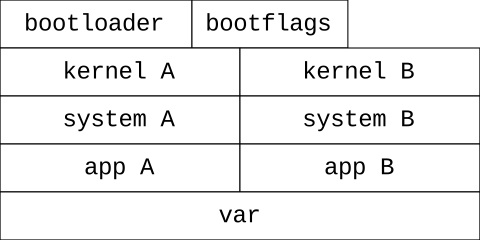
| bootloader: @32KiB, size 2560kiB |
| bootflags & datastore: size 1 MiB |
| kernel-a: size 50 MiB, mount point /boot .. |
| kernel-b: size 50 MiB, mount point /boot .. |
| system-a: size 300 MiB, mount point / ..................................... |
| system-b: size 300 MiB, mount point / ..................................... |
| app-a: size 200 MiB, mount point /app ........................... |
| app-b: size 200 MiB, mount point /app ........................... |
| var: size 200 MiB, mount point /var   ........................... |
- Boot sequence:
- use bootloader components as recommended by NXP: U-Boot SPL, ATF, OPTEE, U-Boot proper
- systemd shall look for user units in /app (and launch user applications automatically from there)
Organize your Yocto workspace
We recommend organizing your workspace by separating your layers from your build directory, as follows:
project-onboarding
├── build
│   ├── conf
│   └── ...
└── layers
    ├── meta-openembedded
    ├── meta-project
    ├── meta-welma
    ├── poky
    └── ...
This adheres to the Yocto standard layout and facilitates updates and maintenance of the distribution.
Set up Yocto layers
We can now start setting up our Yocto build environment.
Setup your Welma manifest:
cd project-onboarding/layers
git clone git@gitlab.com:witekio/rnd/theembeddedkit/welma/welma-manifest.git
Welma's manifest repository will get you to consistent sets of layers that work well together. We're starting from one of Welma's manifests, and simplifying it by removing unnecessary layers.
Our manifest for this onboarding:
# NAME                  URL                                                                        REF
poky                   git://git.yoctoproject.org/poky                                            scarthgap-5.0.5
meta-openembedded      git://git.openembedded.org/meta-openembedded                               b8d1a14f7f3b76457c36752202ea7ae5881b6654
meta-welma             git@gitlab.com:witekio/rnd/theembeddedkit/welma/meta-welma                 1.4.2-scarthgap
meta-welma-sm2s-imx9   git@gitlab.com:witekio/rnd/theembeddedkit/welma/meta-welma-sm2s-imx9.git   1.4.2-scarthgap
meta-freescale         https://github.com/Freescale/meta-freescale.git                            1805a964583d1773310ddbe185a52b0ab3468e6d
meta-swupdate          https://github.com/sbabic/meta-swupdate.git                                4a65b1ed36c0b6ee4942d5f23c4984552b17cfe6
Download Welma layers in project-onboarding/layers:
Create the project layer
We're now creating a Yocto layer to host our modifications.
- In
project-onboarding/layers, create a directorymeta-demo-onboarding
Feel free to refer to meta-demo-onboarding to get the details of the files being modified here.
The files created in this section below are relatively to meta-demo-onboarding.
-
Create
conf/layer.conf -
Create
conf/templates/default/local.conf.sampleMACHINE = "sm2s-imx93-mbep5"DISTRO = "welma"or"welma-wayland"
-
Create
conf/templates/default/bblayers.conf.sample- Put the yocto layer meta-demo-onboarding first
- Put the yocto layers specific to the SOC or the SOM (eg:
meta-freescale)
Build and run
In project-onboarding, set up the Yocto build environment like this:
This copies the template files (bblayers.conf.sample and local.conf.sample)
into your local build directory. Having the templates under source control in
meta-demo-onboarding lets your developers share a common reference.
Optionally, the setup-build-env script can take multiple templates that will
get concatenated.
- Build:
-
You can now flash the whole image:
tmp/deploy/images/sm2s-imx93-mbep5/welma-image-minimal-dev-sm2s-imx93-mbep5.wic.gz -
and run your board.
Configure the partition layout
Now that we have a running Welma image with default values, it is time to customize the partition layout according to our initial choices..
- Create:
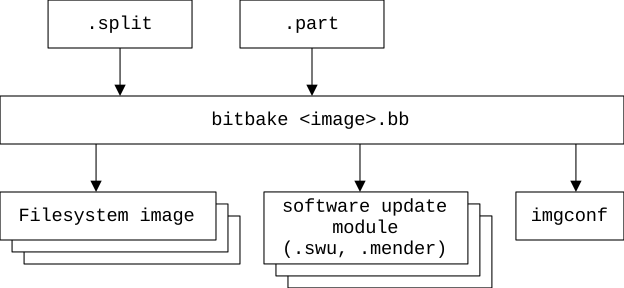
meta-demo-onboarding/split/welma.splitmeta-demo-onboarding/split/welma.part
-
Create your WKS:
meta-demo-onboarding/wic/welma-sm2s-imx93.wks.in- be sure to be aligned with
welma.part
-
Resulting partition layout:
Create the images recipes
- Create the main image recipe (for production):
SUMMARY = "A small image for onboarding on Welma"
inherit welma-image
- Create the development image recipe:
require demo-image-onboarding.bb
inherit welma-image-devel
Add an application
-
Add a recipe for the application:
recipes-onboarding/demo-headless-app/demo-headless-app_1.0.0.bbrecipes-onboarding/demo-headless-app/files/demo-headless-app.service
-
Add our application in our image:
...
IMAGE_INSTALL += "demo-headless-app"
- Build:
- Resulting images:
tmp/deploy/images/sm2s-imx93-mbep5/demo-image-onboarding-sm2s-imx93-mbep5.wic.gz
                                   demo-image-onboarding-dev-sm2s-imx93-mbep5.wic.gz
- Flash & run
Experiment with software update
We can now play and experiment with software update.
-
Among built files we have these swu packages:
-
Upload one of these packages to the target
-
Install a package:
Develop an app with a SDK
If we now want to provide tools to our app development team, we need to build a SDK (Software Development Kit) with the compilation toolchain and necessary libraries.
- Build a SDK:
Welma also provides a tool called welma-update-gen that packs a directory of files into a Welma package. This tool can be used by the app development team to deploy and test the application program on the target device.
- welma-update-gen: