CI/CD
Using a CI/CD infrastructure that builds your Linux images can be very helpful for developers.
- Set up CI/CD infrastructure (Gitlab)
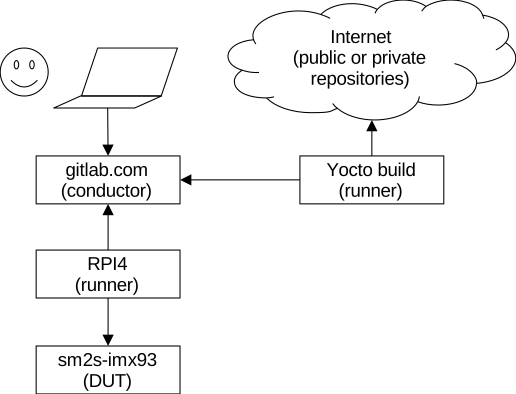
Set up a job to build an image
- Create a dedicated repository cloned from ours:
- Add your jobs in a branch:
- Edit your .gitlab-ci.yml (use Welma helpers from branch main):
.gitlab-ci.yml:
include:
  - project: ${CI_PROJECT_PATH}
    file: /snippets/welma.yml
    ref: 23034130bf0f444785b5aee851b3455dcb2fccc4

stages:
  - "Build Yocto Image"

.job-build-common:
  image: registry.gitlab.com/witekio/rnd/b0000-witekio-welma/dockerfile-yocto/yocto-ci:scarthgap
  variables:
    MACHINE: sm2s-imx93-mbep5
    SSTATE_DIR: /share/sstate
    DL_DIR: /share/downloads
    GITLAB_PACKAGE_NAME: demo-onboarding
    GITLAB_PACKAGE_VERSION: v1.0
    TEMPLATECONF: meta-demo-onboarding/conf/templates/default
    WELMA_MANIFEST_GIT_URI: git@gitlab.com:witekio/rnd/b0000-witekio-welma/welma-manifest
    WELMA_MANIFEST_GIT_REF: 1.4.2-scarthgap
    WELMA_MANIFEST_FILE: welma-manifest/1.4.2-scarthgap/manifest-${MACHINE}.txt

"build:demo-onboarding":
  extends:
    - .job-welma-build
    - .job-build-common
  stage: "Build Yocto Image"
  variables:
    BITBAKE_RECIPES: demo-image-onboarding-dev
Set up job to build a SDK
- Create another job for building a SDK:
.gitlab-ci.yml: